 Spacey
 Remember What You Learn
Spacey schedules your reviews so nothing slips through the cracks. Simple spaced repetition at the topic level — no flashcards required.
You Forget 80% of What You Learn Within a Week
It's not your fault — it's how human memory works. But there's a fix.
The Forgetting Curve
Without review, you forget 80% of new information within a week. Your brain isn't broken — it just needs a system.
Flashcard Overkill
Traditional apps force you to create individual flashcards. For broad topics, that's hundreds of cards you'll never finish making.
Manual Reminders Fail
Setting calendar reminders doesn't work. You forget to set them, they pile up, and they're not spaced at the right intervals.
How Spacey Works
Four simple steps to never forget what you learn.
Learn
Read a book, take a course, attend a lecture — learn something new.
Add
Add what you learned to Spacey in seconds. Just a title and optional notes.
Schedule
Pick a repetition plan. Spacey schedules reviews at optimal intervals.
Review
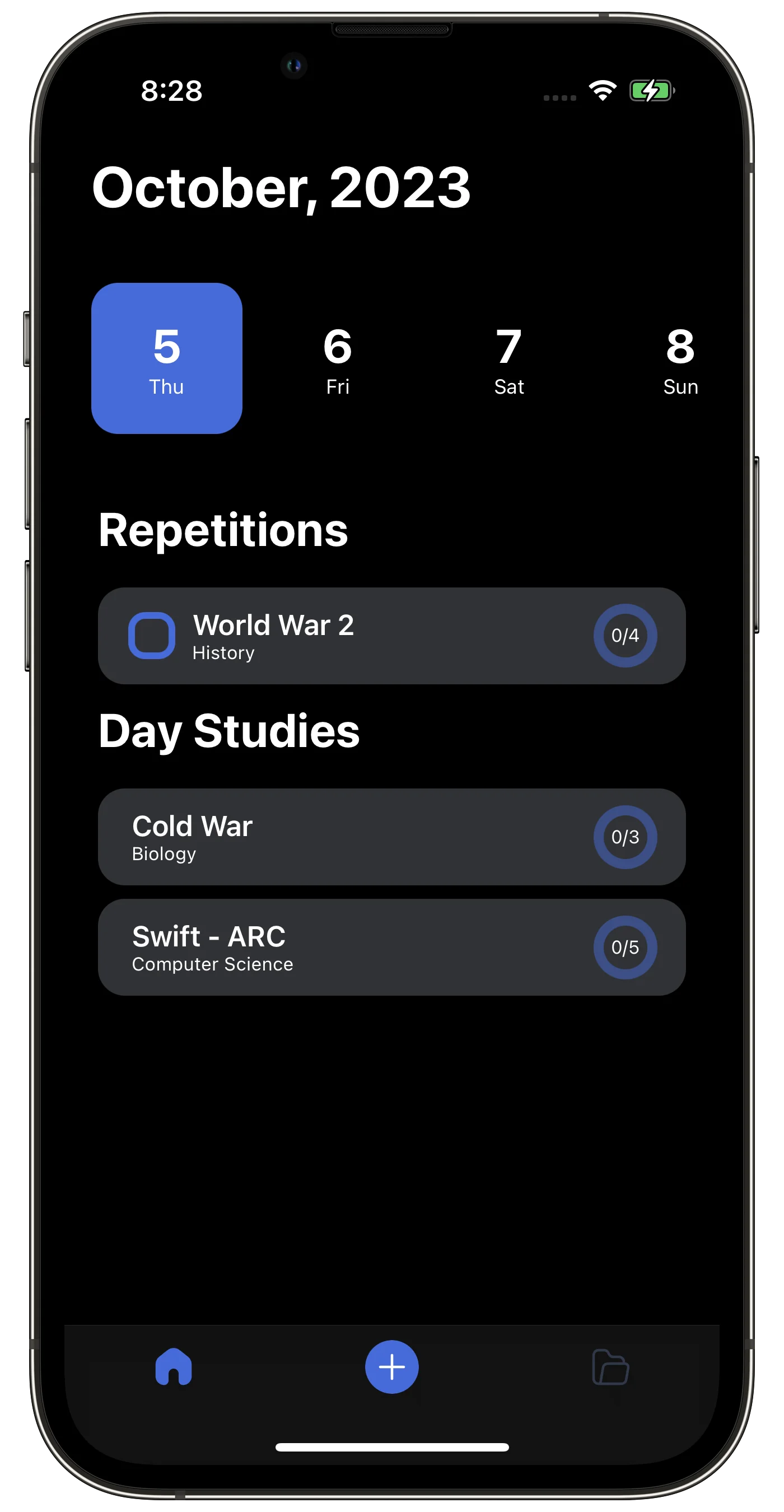
Reviews appear as todos. Check them off when done. That's it.
Everything You Need to Remember
Spacey keeps it simple. No bloat, no complexity — just the tools that matter.
Studies
Organize what you've learned into studies — courses, books, lectures, or any topic you want to retain.
Repetition Plans
Choose from proven spaced repetition schedules or create custom review plans tailored to your needs.
Todo-Style Reviews
Reviews show up like todos. Just check them off when done — no flashcard creation or quizzing required.
iCloud Sync
Your data syncs seamlessly across all your Apple devices via iCloud. No account needed.
Your Data, Your Devices
Your study data lives on your devices and in your iCloud. No account required, no third-party data sharing.
Spacey vs. The Alternatives
See how Spacey stacks up against other learning tools.
| Feature | Spacey | Anki | Quizlet | Manual |
|---|---|---|---|---|
| Setup time | 30 seconds | Hours (deck creation) | 30+ minutes | Varies |
| Granularity | Topic level | Individual flashcards | Flashcard sets | N/A |
| Scheduling | Automatic (SM-2), Manual | Automatic (SM-2) | Manual / basic | Manual reminders |
| Complexity | Simple — minimal setup | Steep learning curve | Moderate | High effort |
| Price | Free / $3.99/mo | Free (desktop) / $24.99 (iOS) | Free / $7.99/mo | Free |
| Account required | No — iCloud sync | Optional (AnkiWeb) | Yes | No |
Simple, Honest Pricing
Start free. Upgrade when you need more.
Free
Get started with the basics
- Up to 10 studies
- Default repetition plans
- Todo-style reviews
- iCloud sync
Premium Yearly
Best value for committed learners
- Unlimited studies
- Custom repetition plans
- Todo-style reviews
- Statistics
- iCloud sync
- Priority support
Premium Monthly
Flexible monthly plan
- Unlimited studies
- Custom repetition plans
- Todo-style reviews
- Statistics
- iCloud sync
- Priority support
Lifetime
Pay once, own it forever
- Everything in Premium
- All future updates
- No subscription needed
What Learners Say
Join thousands of learners who remember more with less effort.
“I was drowning in Anki decks. Spacey lets me track what I've studied at the topic level — way less overhead, same retention benefits.”

“I use Spacey to review programming concepts and technical books. The todo-style approach fits perfectly into my workflow.”

“Finally, a spaced repetition app that doesn't make me create flashcards. I just add my lessons and review when Spacey tells me to.”

Frequently Asked Questions
Everything you need to know about Spacey.
What is spaced repetition?
Spaced repetition is a learning technique where you review material at increasing intervals over time. Instead of cramming, you revisit what you've learned just before you'd naturally forget it — strengthening your long-term memory with minimal effort.
How is Spacey different from Anki or flashcard apps?
Spacey works at the topic level, not the flashcard level. Instead of creating hundreds of flashcards, you simply add what you've learned (a book chapter, a lecture, a course) and Spacey schedules when to review it. Reviews show up like todos — just check them off when done.
Do I need to create flashcards?
No! That's the whole point. Spacey schedules your reviews at the topic level. You decide how to review — re-read your notes, skim the chapter, watch the lecture again. No flashcard creation required.
Is Spacey free?
Yes, Spacey has a free tier that lets you track up to 10 studies with default repetition plans. Premium unlocks unlimited studies, custom plans, and more — starting at $3.99/month.
What platforms does Spacey support?
Spacey is currently available on iOS (iPhone and iPad). Your data syncs across all your Apple devices via iCloud automatically.
Do I need to create an account?
No. Spacey uses iCloud for syncing, so there's no account creation needed. Just download and start using it.
What kind of things can I track with Spacey?
Anything you want to remember long-term: textbook chapters, online courses, podcast episodes, language vocabulary, programming concepts, medical topics, meeting notes — if you learned it and want to retain it, Spacey can schedule your reviews.
How does the scheduling work?
When you add a study, you pick a repetition plan (or create a custom one). Spacey then schedules your reviews at scientifically-backed intervals — for example, 1 day, 3 days, 7 days, 14 days, and so on. Each review appears as a todo on the scheduled day.
Start Remembering Today
Download Spacey and never forget what you learn. Free to get started — no account required.